Engineering Solutions
OmniGuard 6 Differential Pressure Recorder Cellular Modem Manometer - OG6

- SKU:
- 280-OMNIGUARD6
- MPN:
- Omniguard 6
- Condition:
- New
- Availability:
- In Stock, Ships Quick!
- Shipping:
- Calculated at Checkout
Bulk discount rates
Below are the available bulk discount rates for each individual item when you purchase a certain amount
| Buy 2 - 5 | and pay only $1,749.95 each |
| Buy 6 or above | and pay only $1,599.95 each |


Description
OmniGuard 6 Differential Pressure Recorder Cellular Modem Manometer - OG6
Includes 2 Years of Verizon Wireless Service plus improved WiFi connectivity for reliable remote monitoring.
Purpose-Built for Containment Monitoring and Documentation
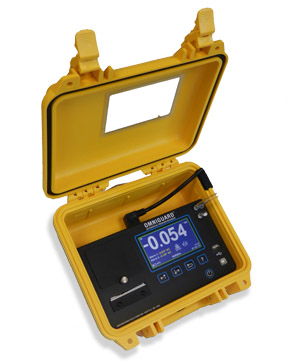
The OmniGuard 6 is designed to monitor and document vacuum and pressure inside containment areas. It is commonly used for asbestos, lead, and mold abatement monitoring and for clean room monitoring.
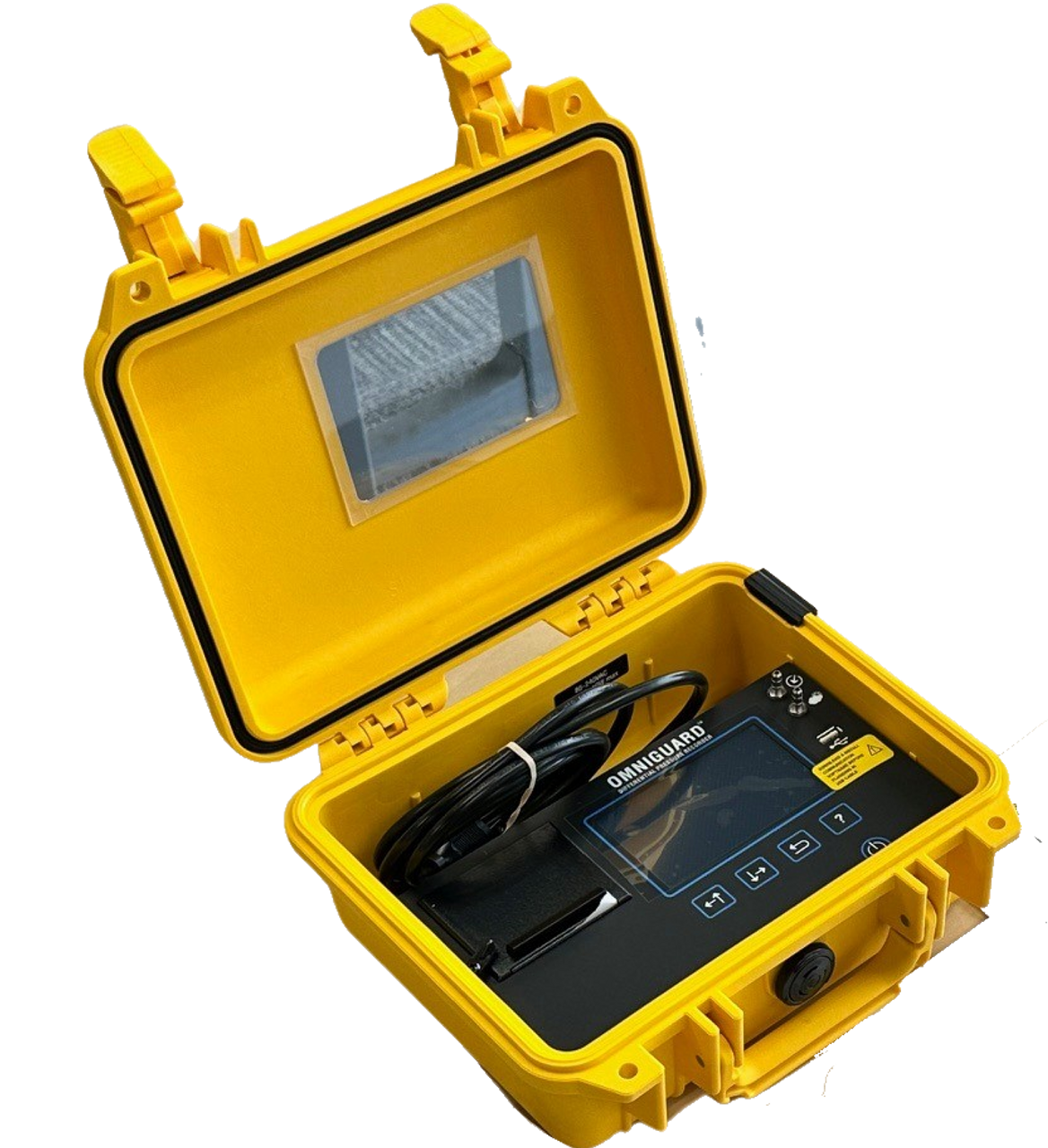
The self-contained design keeps essential components protected inside the case so the unit can operate with the lid closed. Dual inlet ports allow monitoring between two areas, supporting real-time differential pressure and/or vacuum tracking.
What’s New in OmniGuard 6
- Upgraded enterprise WiFi compatibility for robust connectivity in hospitals and other large institutions
- New, more durable printer with easy-load paper replacement
- Upgraded cellular modem for increased power, reliability, and longevity
- Expanded log storage (4 MB) designed to hold 6+ months of normal job logs
- Built-in lithium ion battery supports portable operation up to 6 hours without AC power
- International power supply operation (80–240 VAC, 50–60 Hz)
- Multilingual interface options: English, French, and Spanish
Cellular and WiFi Connectivity for Remote Updates
The internal cellular modem helps you stay on top of projects when you are away from the job site. Receive status updates such as power changes, waiting for pressure, alarm conditions, or normal operation.
- Enter up to four email addresses to receive status updates, job logs, or both
- Email job log once per day at a selected time
- WiFi supports 802.11 b/g/n with WEP, WPA, or WPA2
- WiFi and cellular can email status changes up to four times per hour and send the last 24 hours job log once a day
- First two years of cellular service are included with purchase (Verizon coverage required in the USA)
Mobile app support for iOS and Android enables easy remote monitoring and notifications of multiple devices in one place.
On-Site Documentation and Easy Log Retrieval
OmniGuard 6 includes an integrated thermal printer for physical logs and on-site documentation without ink ribbons. Log collection is supported by dual USB ports, allowing PC communication and direct export to a flash drive.
- USB Type-A port: save logs directly to a flash drive
- Second USB port: PC communication for transferring logs, real-time monitoring, and configuration editing
- View logs on screen and scroll through memory contents
- Adjustable print/log intervals to conserve paper and memory
- Automatic printout and logging of all settings changes
Clear Alarms, Wind-Stabilized Performance, and Tamper Protection
- Programmable high and low alarm setpoints
- 95 dB audible alarm plus on-screen alarm indication
- Variable response rate to reduce nuisance alarms in windy environments
- Passcode protection and setting audit trail to help prevent tampering
Built In Cellular Modem
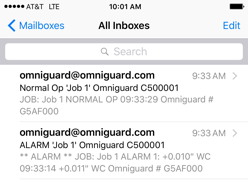
The internal cell modem lets you keep on top of your projects even when you're away from the job site. Get status updates when your Omniguard is turned on, when it starts monitoring and if it goes into an alarm.
Once a day, you can get an email with the job log for the last 24 hours for you to review and keep for your records. Two years of service are include free when you register.
Increased Battery Power
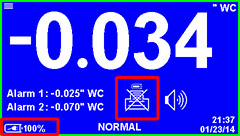
With the addition of a built in lithium ion battery the Omniguard can now operate for up to 6 hours with out AC power. Even if you are working in an environment with potential power interruptions, you can be confident that your continuous job log will not be interrupted by a short loss of power.
Power saving features such as auto shut off of the printer tape and a reduction in screen brightness allow the Omniguard to continue to monitor, and then will auto reset once power is available. The Omniguard makes it easy to monitor the battery life by indicating a power level percentage whenever the Omniguard is running off battery power.
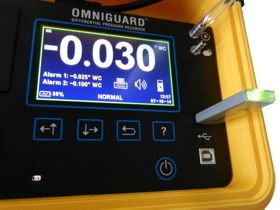
USB Flash Drive Compatible
Save logs directly to a USB flash drive on the job site. No need to carry a laptop with you or bring your Omniguards into the office just to retrieve the logs.
You can view and store the log files on your PC later using our free software.
International Upgrades
The Omniguard is now multilingual. Both the Omniguard user interface and the Omniguard Communication Software are now available in French as well as English. We will also be releasing the update for the Spanish firmware soon.
The Omniguard is equipped to handle the different power needs for our overseas customers. Each Omniguard now comes with a standard 85-240VAC power supply. Modifications for our international Omniguard are no longer necessary, which means lower costs for our customers and quicker turnaround for our international orders.
| Operating Pressure Range | +/- 0.250 inches Water Column ( +/- 6.35 mm WC, +/- 62.5 Pascals) | |
| Accuracy | +/- 0.003 inches Water Column or +/- 1% of reading whichever is greater | |
| Resolution | 0.001 inches Water Column ( +/- 0.05 mm WC, +/- 0.5 Pascals) | |
| Burst Pressure | 3 psi (20 kPa) on either inlet nozzle | |
| Pressure Units | "WC (inches Water Column), mmWC (millimeters Water Column) or Pa (Pascals) | |
| Data (Log) Storage | 4 MB non-volatile memory |
|
| Display | 4.3" Color Touchscreen LCD (480 x 272 pixels) | |
| Internal Clock | The internal clock is powered by a self-charging lithium-ion battery that provides clock operation when AC power is not present | |
| Printer | 20 character wide thermal printer (uses 2.2" wide thermal printer paper) | |
| Pressure Reading Log Rates | Normal Operation -- Highest and lowest pressure readings are logged & printed at intervals of 5, 15, 30 minutes or OFF Alarm Condition -- Highest and lowest pressure readings are logged & printed at intervals of 15, 30, 60 or 120 seconds for first 10 minutes of alarm condition, increasing to 15 minute intervals thereafter |
|
| Alarms | Two programmable alarm settings, 95db audible alarm and red bordered on-screen warning indicate alarm condition | |
| Cellular Service | Cellular modem can email status changes up to four times per hour and the jog log of the last 24 hours once a day. First two years are free. Service is provide by Verizon and is only available in areas with Verizon coverage in the USA. | |
| WiFi | WiFi can email status changes up to four times per hour and the jog log of the last 24 hours once a day. Supports 802.11b/g/n with WEP, WPA or WPA2. | |
| Pressure Inlet Nozzles | Two 3/16" OD barbed hose connectors, 10 ft of pressure hose provided | |
| USB Port | USB V1.1 Type-A | |
| USB Port | USB V1.1 Type-B | |
| AC Power | 80-240 VAC 50-60Hz 10W (with 6 ft power cord) | |
| Battery Power | Internal rechargeable 3.7 Volt Li-ion type battery provides 4-6 hours of portable operation Recharges in 4 hours when AC power is available (printer is disabled when powered by battery) |
|
| Case | Dimensions 9.25" x 7.5" x 4.5" / Shipping Weight 8 lbs | |
| Warranty | One Year Limited Warranty |
Rugged. Accurate. Easy.
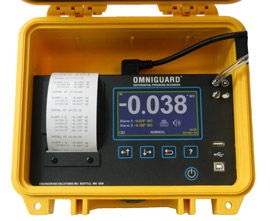
Easy To Use
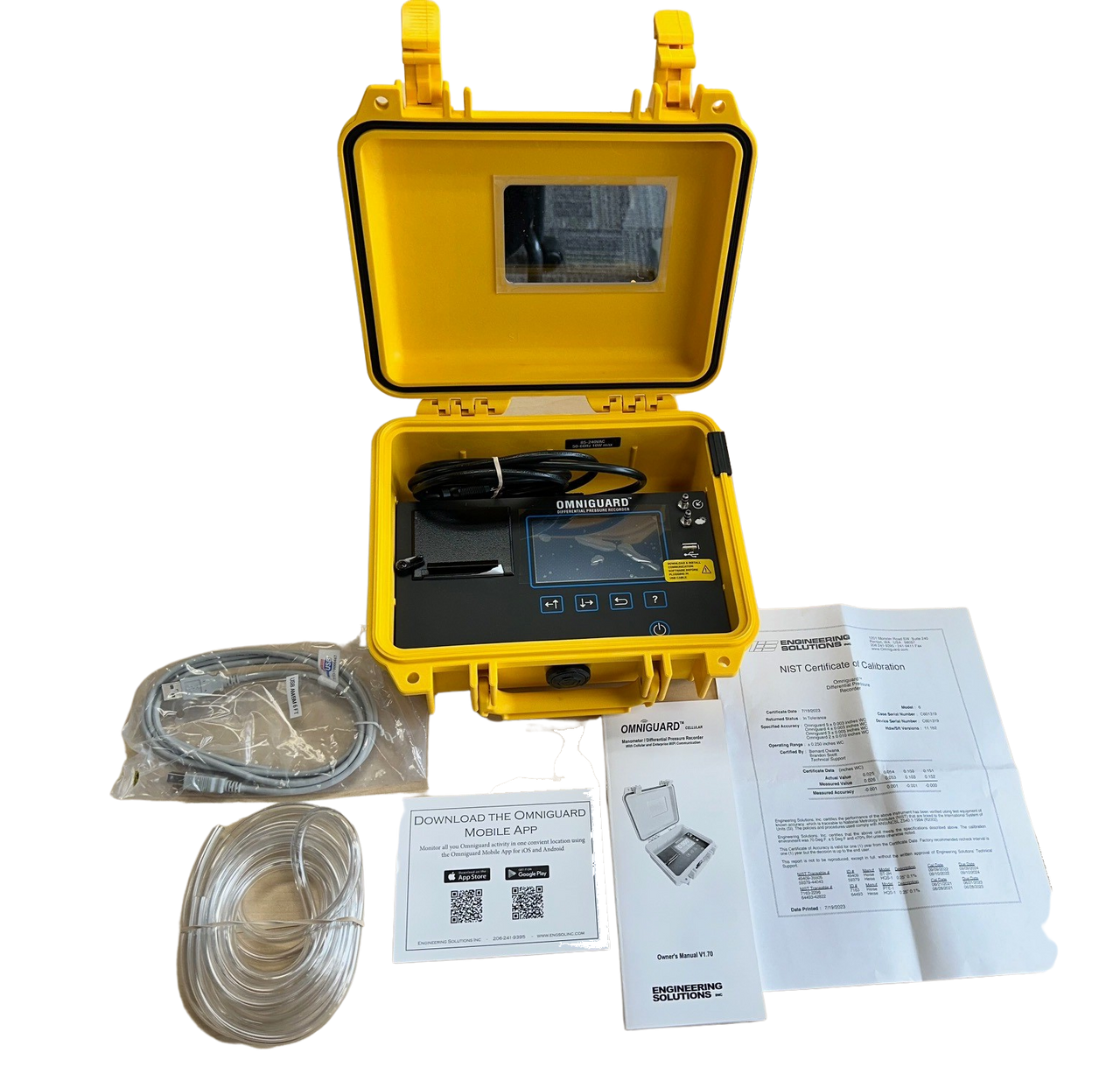
The Omniguard is a differential pressure recorder in a completely self-contained package, designed from the beginning to be extremely versatile yet easy to use. The included accessories, owner's manual, hose, a spare roll of paper and AC cord, store easily in the lid. There's no AC adapter to keep track of.
It's easy to find a convenient spot to place the unit since the Omniguard is not position sensitive and can be hung by a nail using the built in hanger. Accurate measurements continue even if the unit is repositioned or moved. The 4.3" color graphics display provides the easiest setup possible. Pressure is indicated with large easy to read characters and alarm setpoints are always displayed. Screen icons show the monitoring, printer and audible alarm status with a glance. Detailed information for job setup, feature settings and operating instructions, and troubleshooting tips are available on-screen at any time by accessing the Help menu. Pressure readings are time stamped and logged into memory once containment has been established. Audible and visual alarms activate whenever the pressure reaches the alarm setpoints.
The Omniguard ensures the site inspector that proper containment was maintained. Logs and summary reports can be printed at any time for easy inspection of the monitoring data. Durable and reliable, the Omniguard is clearly the contractors choice for containment monitoring.
Easily navigate the menus and settings using the user-friendly touch screen interface.
The intuitive lay out and menu orientations mean you can quickly and easily set up and start a job. Touch the icons on the home page to adjust their correlating set points, and use the alpha numeric key board to personalize the contractor and job names and password protection settings.
Multiple screens allow the user to easily inspect and adjust the settings for specific job requirements.
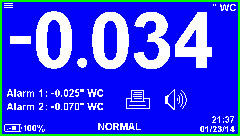
Home Screen View current pressure reading and alarm settings. Monitoring status is shown at the screen bottom. Printer and Alarm status are indicated by on-screen icons. The color-coded border represents the different alarm conditions. |
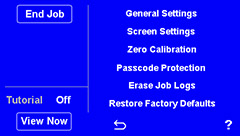
Main Menu Scroll through a menu of all the editable functions and settings. Start or end a job and access the tutorial. |
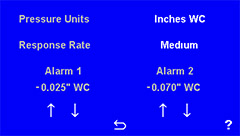
Alarm Settings Screen Make changes to configurable alarm set points, response rate and unit of measure. Saved settings are logged into memory and printed to the report. |
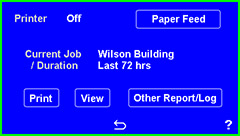
Printing and Reports Find, view and print reports with ease from the printer/reports screen. Quickly turn the printer on or off, and view a report on the screen prior to printing. Simply scroll through any of the saved job logs on the Omniguard and choose the duration of the report you would like to print, ie: Today's job log, the last 24hr, 48 hrs, 72 hrs or the whole report. |
|
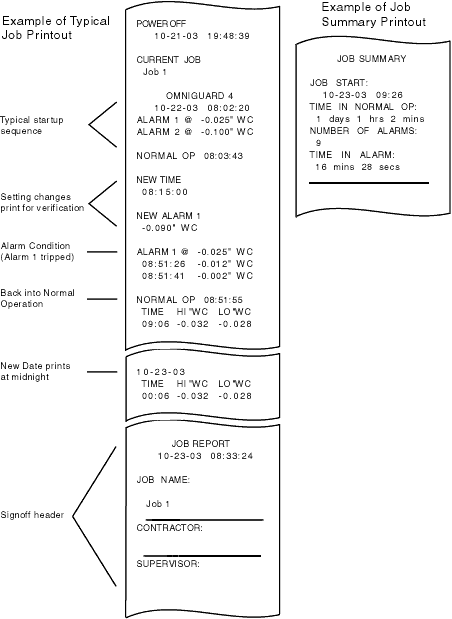
Easy To Read The Omniguard comes equipped with a thermal printer that provides a detailed, easy to read log of the pressure in the containment area as well as recording any changes made to the setup. Retrieving the data log is now quick and easy and more comprehensive than ever before. Touch the printer icon to bring you to the Printer Settings Menu, choose from any job log stored on the Omniguard, then choose to print the log from today, the last 24/48/72 hours, or the entire log. You now also have the option to view the log directly on the screen, rather than printing the entire log. Each of these reports offers the user specific, pertinent information and a hard copy record of the data logged from the containment area. Each printout provides a summary of the current job status, including the amount of time in Normal Operation, the number of Alarms and the amount time in Alarm Conditions (if any) along with an area for sign-off. In addition, a Configuration Report can be viewed and printed from the Printer Settings Menu. The Configuration Report provides a hard copy of all of operational settings, memory usage and log space available. |
 |
Warranty Information
Frequently Asked Questions
What does the OmniGuard 6 monitor?
OmniGuard 6 monitors differential pressure and/or vacuum level using dual inlet ports to track conditions between two areas.
How do I get job logs off the device?
You can export logs to a USB flash drive, transfer logs to a PC via USB, view logs on screen, print logs using the integrated thermal printer, and receive automated job logs by email through WiFi or cellular service.
Does OmniGuard 6 work without AC power?
Yes. The built-in lithium ion battery supports portable operation for 4–6 hours without AC power. To conserve power, printing is disabled when operating on battery.
Related Products
Related Products

Adaptive Manometer Systems Pressure Pro Differential Pressure Recorder
Adaptive Manometer Systems, Inc.

Digital Differential Pressure Gauge for HepaZone - HZ-24
Qualitair