


If your crews work in confined spaces, around combustible gases, or anywhere oxygen levels and toxic gases can change without warning, a portable multigas detector isn't optional — it's the difference between going home and not. The MSA ALTAIR® 4XR multigas detector is one of the most trusted instruments in the industry, but like every gas monitor, it only protects you when it's properly calibrated. In this guide we'll cover what makes the ALTAIR 4XR stand out, why calibration matters, and how to troubleshoot the most common calibration failures.
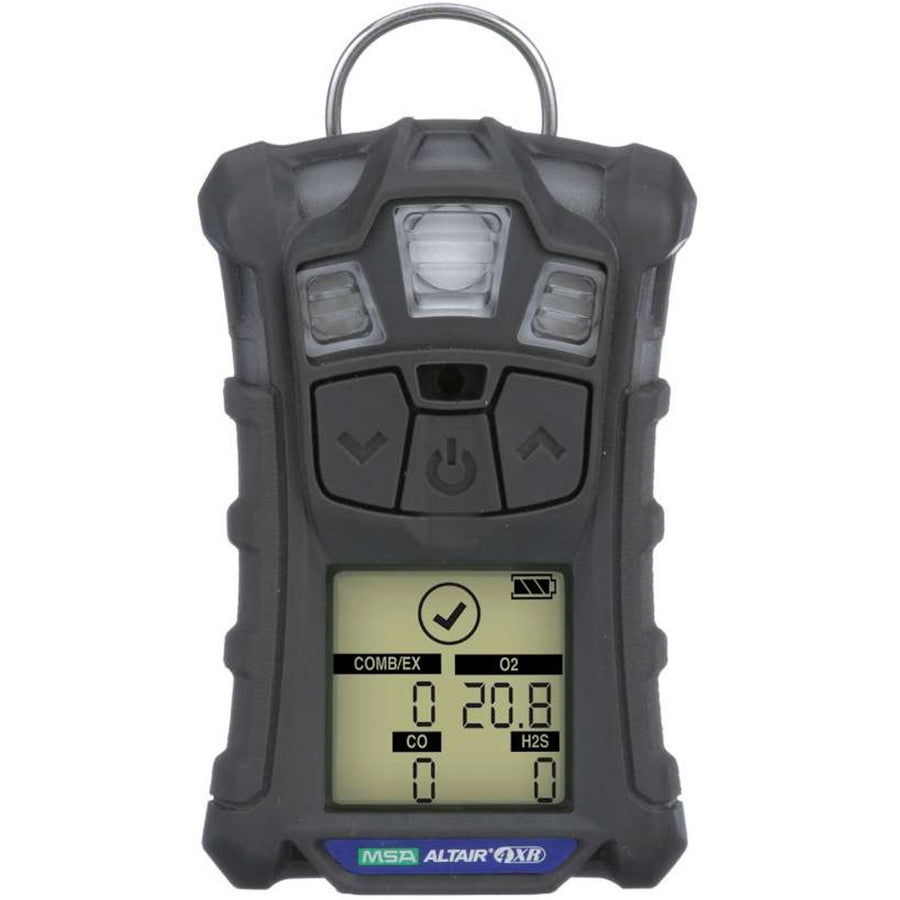
What Is the MSA ALTAIR 4XR Multigas Detector?
The MSA ALTAIR 4XR is a rugged, four-gas portable monitor that simultaneously measures the four gases responsible for most atmospheric hazards on the job:
- LEL (combustible gases) — methane, propane, and other flammables before they reach explosive levels
- O₂ (oxygen) — both oxygen deficiency and enrichment
- CO (carbon monoxide) — the silent killer in enclosed and poorly ventilated spaces
- H₂S (hydrogen sulfide) — common in wastewater, oil & gas, and agriculture
Key Features & Benefits
- Rapid-response MSA XCell® sensors — sense gas 2 times faster than the industry average, with fast span calibrations and an expected sensor life of more than four years.
- Built tough — survives 25 drops from 4 feet (MIL-STD-810G 516.6), dust- and waterproof to IP68 (2 meters for at least 1 hour), and operates from -40°F to +140°F.
- Glove-friendly operation — large buttons and a bright display enable quick, easy operation even while wearing gloves.
- MotionAlert™ & InstantAlert™ — MotionAlert activates after 30 seconds of immobility if a worker goes down; InstantAlert lets workers manually warn others nearby.
- Bluetooth connectivity — pairs with MSA's ALTAIR Connect app for wireless configuration, event logging, and instant alarm notifications.
- 4-year warranty — the longest in its class, backed by datalogging for compliance records.


What's Included
- ALTAIR 4XR detector (LEL, O₂, CO, H₂S configuration) with datalogging
- Charger
- Calibration cap with tubing
- Charcoal carrying case
- 4-year warranty
Note: calibration gas and regulators are sold separately — see the calibration kits below.


Why Gas Detector Calibration Matters
Gas sensors drift over time. Exposure to extreme temperatures, humidity, sensor poisons, and everyday knocks all gradually change how a sensor responds to gas. Calibration corrects for that drift by exposing the sensor to a known concentration of certified calibration gas and adjusting the instrument's response to match.
Bump Test vs. Full Calibration
| Bump Test | Full Calibration | |
|---|---|---|
| What it does | Verifies sensors and alarms respond to gas | Adjusts sensor readings to a certified gas concentration |
| How often | Before each day's use (best practice) | Per your safety program and MSA's guidance — and any time a bump test fails |
| Time required | Seconds | About a minute with XCell sensors |
To perform either one, you need a calibration kit matched to your instrument: certified multigas calibration cylinder, a proper regulator (0.25 LPM fixed-flow for the non-pumped ALTAIR 4XR), tubing, and a calibration cap.
How to Calibrate Your MSA ALTAIR 4XR: Step-by-Step

Before beginning calibration, make sure you're in a fresh-air environment free of harmful gas.
To manually calibrate the MSA ALTAIR 4XR, you'll need a 0.25 LPM fixed-flow regulator, calibration gas, and the calibration cap with tubing that came with your 4XR.
-
Initiate Normal Reading Mode
- Make sure you're in a fresh-air environment free of hazardous gas.
- Press and hold the center button of the MSA ALTAIR 4XR to turn it on.
- The monitor will run through several self-checks after turning it on.
-
Enter Calibration Mode
- Once in normal reading mode, press and hold the "UP" arrow for 3 seconds.
- Wait until the device beeps and prompts you to zero the monitor with a ZERO CAL message (this is the sensor refresh on the MSA ALTAIR 4XR).
-
Confirm Calibration Mode
- When prompted on the screen, press the center button once. This initiates the zeroing mode.
- Set the monitor down and prepare your calibration tools: calibration gas, regulator, and calibration adapter.
-
Set Up the Regulator
- First, open the regulator valve.
- Attach the opened regulator to the gas cylinder. Important: ensure the regulator is opened before attachment to avoid damaging the calibration gas cylinder.
- When you hear gas spewing out, close the regulator immediately.
- Continue to screw in the regulator until it's firmly in place, but avoid overturning.
-
Connect the Tubing
- Attach the tubing to the hose barb on your regulator.
- Ensure the opposite end of the tubing connects securely to your calibration adapter.
-
Apply Calibration Gas
- Once the monitor shows ZERO PASS, indicating a successful Zero Cal, it will flash SPAN CAL?
- Press the center button to confirm calibration.
- Clip the calibration adapter into your gas detector and turn on your gas.
- Double-check that the calibration gas values displayed on the screen match those on your calibration gas cylinder.
-
Finalize Calibration
- After the calibration process completes, the detector will beep and flash SPAN PASS, indicating you can turn off your gas.
- Carefully detach the calibration adapter from the MSA ALTAIR 4XR.
- The device will revert to normal reading mode shortly.
Congratulations! Your MSA ALTAIR 4XR gas monitor is now calibrated. Remember to note these readings in your calibration log, and keep calibrating regularly to ensure it's functioning properly.
Calibration Kits & Supplies for the ALTAIR 4XR

Need a regulator and calibration gas? Grab a complete kit:
MSA ALTAIR 4XR Calibration Kit
Everything you need for routine bump tests and span calibrations on your 4XR.
MSA ALTAIR 4XR Calibration Kit with Pump Probe
Adds a pump probe for remote sampling — ideal for confined space entry checks.
MSA ALTAIR 4XR Multigas Detector (LEL, O₂, CO, H₂S)
The 4-gas workhorse itself — rugged, Bluetooth-enabled, 4-year warranty.
Common ALTAIR Calibration Failures — and How to Fix Them
Based on MSA's official Calibration Failures Troubleshooting Guide (Bulletin 0800-158-MC), most calibration failures trace back to one of five sources. The pattern of the failure tells you where to look:
- Multiple sensors failing on multiple instruments → suspect the gas delivery system: leaks at fittings and grommets, the wrong regulator, or pinched tubing diluting the calibration gas.
- The same sensor failing across instruments → suspect the calibration gas: expired cylinders lose concentration over time (especially reactive gases like chlorine and ammonia). Try a cylinder from a different lot.
- One instrument failing consistently → check that unit's filters, sensor gasket, and calibration cap seal.
- Sensors dying early → look for sensor poisons in the environment: silicones, lubricants, high-concentration sulfur compounds, and lead compounds permanently damage LEL sensors.
- Sensor drifting or alarming right after a successful calibration → likely inhibitor exposure: alcohols, hand sanitizers, cleaning products, and solvents near the calibration area temporarily depress sensor response. Clean detectors only with a water-dampened cloth.
Frequently Asked Questions
How often should I calibrate my MSA ALTAIR 4XR?
Follow your company's safety program and MSA's operating manual. As a best practice, bump test before each day's use and perform a full calibration on the schedule your program requires — and immediately any time a bump test fails.
Why does my ALTAIR fail calibration right after a successful one?
Sensor drift or alarms shortly after a passing calibration usually mean gases were present during calibration or the sensors were exposed to inhibitors such as alcohols, hand sanitizer, or cleaning products. Move to clean air, keep chemicals away from the calibration area, and recalibrate. LEL sensors may need two or more back-to-back calibrations to burn off the inhibitor.
Can I use expired calibration gas?
No. Gas concentration drops over time — especially with reactive gases — so an expired cylinder will cause calibration failures and inaccurate readings. Always check the expiration date before calibrating.
What regulator do I need to calibrate an ALTAIR 4XR?
The ALTAIR 4XR is a non-pumped (diffusion) instrument, so it requires a 0.25 LPM fixed-flow regulator. Pumped instruments like the ALTAIR 5X require a demand-flow regulator instead.
What chemicals can damage my gas detector's sensors?
Silicones (common in lotions and sprays), silicates, phosphates, lubricants, lead compounds, and high concentrations of sulfur compounds can permanently poison LEL sensors. Alcohols, acetone, ketones, and solvents temporarily inhibit sensors. Clean your detector only with a cloth dampened with water.
Need help choosing a detector or cal kit?
Jendco Safety Supply — family-owned in Columbus, Ohio since 1989. We'll get you the right gas detection setup.
